Archive for the ‘Websites’ Category

Improve Your Online Personal Security

Wednesday, March 10th, 2010

With the explosion of the internet in the last ten years and the ever increasing use and reliance on it to perform our every day life and work, it has become more important than ever to consider your personal security online.

The overwhelming majority of internet users have no idea at all about the steps required to help protect their personal information online. This can be seen by the massive surge in identity theft in the last five years, which is happening online and offline.

To help combat that epidemic, below are my top recommendations to lower your risk of identity theft and improve your online personal security:

  1. Don’t Share Your Account Information
    Just like your PIN number on a debit card or your credit card number, don’t share your account information for with anyone. If you have in the past, regardless of how much you might trust that person – make a point of changing your password as you don’t know how lax they have been with your personal information.
  2. Don’t Reuse Your Account Information
    People hate having to remember different usernames and passwords for different web sites. However, reusing your account information from one site on another puts all of your online accounts in serious jeopardy if someone tries to attack your identity online.
  3. Create Different Accounts For Different Purposes
    For most people it is hard enough to not reuse your account information across literally dozens of different online accounts. However, if you can’t manage a unique set of credentials for each web site – at a minimum group the web sites by type (email, social network, banking, online shopping, ..) and use a different set of credentials for each site. At least if someone gains access to your Facebook account, they don’t automatically get access to your bank accounts.
  4. Choose Strong Passwords
    Just like people hate having to remember different usernames, people hate having to remember different passwords. This leads people to using a simpler password, in the hope that they’ll be able to remember it. That mental stumbling block is the perfect attack point for an average user, as their password will probably be a dictionary word or another simple combination of characters such as ‘12345′. When creating a password, regardless of whether it is for an email account, social networking or an internet banking account – it should contain lower case, upper case, numbers, special characters and be at least 8 characters long. I know that sounds like a lot of hoop jumping but there are simple ways to remember a complex password, such as using a memorable phrase and replacing a few characters within it.
  5. Reduce The Number Of Online Accounts
    With the creation of the authentication protocol OpenID, web site developers now have the ability to allow clients to create a new account without having to worry about managing yet another password. Instead users can signin using an existing account such as a Google, Microsoft Live, Yahoo!, AOL and many more. By signing up using an OpenID enabled account, you have one less password to remember and when you change your password – it is changed on all sites that are linked to it. It might seem as though using OpenID contravenes points 2, 3 and 4 above however it doesn’t because you can create one more OpenID accounts and use a strong password on each instead of something simple like your pets name.
  6. Ensure You’re Using HTTPS
    If you’re logging into a site or disclosing your personal information online, make sure you’re currently viewing that web site in HTTPS. The ’s’ in HTTPS stands for secure and it uses high strength encryption to keep your personal information private when transferred from your web browser to the web site in question. If you aren’t viewing it site in HTTPS, your personal information is transferred across the internet in clear text that anyone could potentially read.
  7. Practice Minimal Disclosure
    The internet is a public medium, once you put your personal information out into the public realm – it could very well remain their for the foreseeable future. That means that anyone that might be inclined to go looking for information about you can find it with ease. With that in mind, you should make a point of only ever publishing as much information about yourself on a web site as you’d be happy to have displayed on a billboard beside a busy motorway.
  8. Consider Using A Password Manager
    If you do have dozens of different accounts and you cannot keep up with it all, consider using a password manager. You can generate a strong, high complexity random password for every site you create an account on and store it within your secure password manager. If and when you need to signin to that site again, simply look it up within the password manager. If you don’t want to use a standard desktop password manager like KeePass, there are also some fantastic secure password managers which provide web browser integration such as LastPass.
  9. Your Email Address Isn’t Your Username
    If a web site doesn’t support OpenID but it does allow you to create a username that isn’t your email address – you should take them up on that offer. While convenient, your email address isn’t your username and can lead to issues in the future if you lose that email account. A friend of mine signed up to Amazon using their Hotmail account and it was previously used by another person but expired. Once signed in, my friend could see all of the previous owners personal information they’d provided Amazon, including name, address, purchase history and more.
  10. Shared Computer Access
    If you’re in a position where you use a computer and it is shared between a number of different people, either at home, work or elsewhere – always remember to clean up after yourself. Most web browsers have the ability to remember usernames and passwords for convenience. However if you’re using a shared computer, you could be leaving your account information laying around for someone else to pray on. An easy solution for this is to simply clear all the temporary internet files when you’re done or before logging out of the machine. If that seems like it is too much hassle, the latest versions of Internet Explorer, Firefox, Chrome, Safari and Opera all provide a privacy mode or private mode which won’t keep any history of your activity while it is enabled.

While there might seem like a lot of things above to consider, those ten items certainly aren’t the only things you can do to improve your identity management process. In a future post, I’ll talk about how you might go about implementing some of my recommendations above so you can take the first step, which is often the hardest.

DoFollow No Longer

Wednesday, March 3rd, 2010

In 2005 Google decided they were going to attempt to unsettle the online spam ecosystem by recommending that web sites add an additional attribute to a link from site A to site B if they were not verified to be trustworthy. For instance, if someone left a comment on my site who I didn’t know or couldn’t vouch for – I would add a rel=”nofollow” to the link to their site.

While it sounds like a small change, the longer term plans were for search engines to not include those links when ranking a given web sites content. It was common place for spammers to comment spam thousand or millions of blogs, leaving a link to their preferred sites. Before the rel=”nofollow” attribute was introduced, the search engines had no way of knowing if a web site owner trusted that site and as such had to use other methods of measuring trustworthiness.

The intention is clear, by removing the incentive for a spammer by using rel=”nofollow” in the links – it was hoped it would have an impact on the insidious and incredibly aggressive spam ecosystem online. Unfortunately, spammers aren’t the kind of people that just roll over at the first sign of a battle and the war on spam raged on. As the rel=”nofollow’ attribute gained momentum over the years, spammers have subsequently sought out web sites which were considered dofollow – in that they have clean links that the search engines will count when ranking a web site.

As I’ve upgraded WordPress over the years, I’ve been carrying the same set of themes or templates forward through the upgrades and hadn’t bothered to upgrade to a newer base theme. Of course this meant that links from my site were dofollow links and were valuable to the spammers. So valuable in fact that my site has been listed countless times on different forums as being a dofollow blog – essentially proclaiming to the spammers of the world that they should target my site for high quality backlinks.

I’m happy to say that after a recent upgrade to WordPress 2.9.x, I ported my current theme over to a new base theme provided in the 2.9.x code base which uses rel=”nofollow” links by default. In fact, if I want to allow people to have clean links – I’ll need to specifically allow them by use of a plugin – which is fine by me.

This will no doubt upset the spammers out there that thought they’d be getting easy, free dofollow links from my site. While I understand why they want my clean links, I also hate having to deal with comment spam – so I’m going to leave my comments rel=”nofollow” from now on.

Twitter Is Over Capacity

Wednesday, January 20th, 2010
Twitter Fail Whale Error Message

Twitter is over capacity at the moment and the famous fail whale is on display.

I wonder if it has anything to do with Bill Gates joining Twitter today and amassing over 175,000 followers in less than 12 hours.

2009 Traffic Statistics

Tuesday, January 5th, 2010

Following on from my 2008 web statistics, below is a summary of what traffic the site took in 2009.

In 2006 the site took about 95,000 visitors, increasing to 145,000 and declining to 135,000 respectively in 2007 and 2008. In 2009 the site took 106,930 visitors over the entire year which resulted in 136,525 pageviews. It’ll come as no surprise that from a traffic driving potential, a lot fewer people are interested in reading about my personal ramblings compared to technical style posts that I used to post.

While last year saw a couple posts catch a moderate amount of attention and punch through the metronomic rise and fall in traffic each day, in 2009 none of my posts really got any traction within the greater internet. Not surprisingly traffic did start to decline towards the end of the year, however I’m happy that it wasn’t obliterated like it was last year when I moved web servers within the same host.

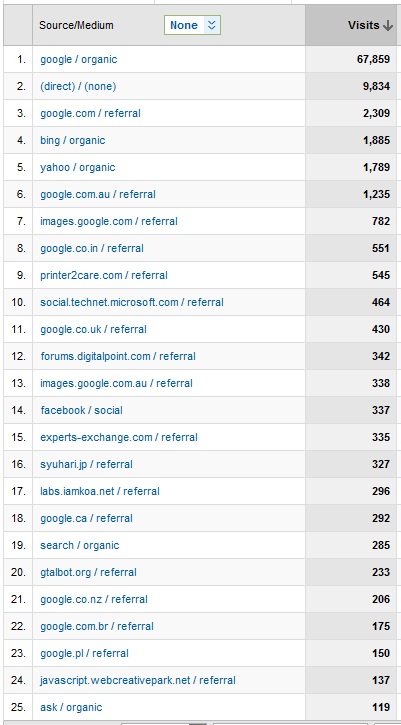
The traffic breakdown, just like in 2008  shows the complete dominance that Google has within the web search market. Yahoo! are still the first non-Google search engine and is still delivering approximately 2.5% of the traffic the they were in 2008. The latest addition to the web search ecosystem is Microsoft’s Bing, which sits at position five. Of course, that isn’t a fair comparison since they haven’t been around for the entire year. If you count Bing, Live and MSN together they drove about 1750 visits for the year putting them in at fourth however by the end of May 2010 I expect Bing to have delivered 2000 visits – narrowing the gap against Yahoo!.

The most popular posts for the year were similar to 2006, 2007 and 2008 but with a few newcomers:

  1. Select Option Disabled & The JavaScript Solution
  2. Disable Options In A Select Dropdown Element
  3. Oracle RETURNING Clause
  4. HP Laserjet & Windows Vista Driver Support
  5. ORA-04030: out of process memory when trying to allocate <x> bytes

Removing those posts from the top of the list since they clearly dominate, changes things a little:

  1. Making HP Laserjet Printers Work In Windows Vista
  2. Oracle Dynamic SQL Using The DECODE Function
  3. ASP Error ‘ASP 0104: 80004005?
  4. ORA-06552: PL/SQL: Compilation Unit Analysis Terminated
  5. Australian Idol 2006 Contestants: The Real Contenders

However still none from 2009 were showing up in the list. Isolating the posts written in 2009 and the landscape is vastly different:

  1. Apple iTunes Store Account Signup Process Needs Work
  2. Windows Vista Business Double Clicking On Single Click
  3. Best Home Phone Plan & Telstra
  4. Apple iTunes Account Verification Has Poor Usability & User Experience
  5. Gold Coast Beach Weddings Are Spectacular

I find it telling that my two gripes about the quality of the Applie iTunes account sign up process are within the list. You’d assume a company with a market capitalisation of nearly USD$200 billion would have such a visible component of their business highly polished but it just goes to show everyone has their problems. Having a home phone plan comparison post residing at position three is just more evidence that the consumer is becoming more savvy by researching online, even when purchasing offline.

Onward and upward for 2010!

Best iPhone Apps According to First & 20

Saturday, September 26th, 2009

I stumbled onto a neat site today named First & 20, which lets you show people how you have your home screen on your iPhone configured. The neat thing about the site is that it keeps track of how many times different iPhone apps have been used on a home screen, which essentially is like users voting for the best iPhone apps. The site doesn’t put any restriction on what type of application you use on your home screen either, just that you think it warrants being on your home screen, paid or free – it doesn’t matter. While looking through the different configurations I’ve just found a raft of useful iPhone apps that I didn’t even knew existed – so that’ll help me out for sure when I finally get my hands on a new iPhone.