 I got home from work and Hugo met me in the garage like normal and he says to me:
I’m grumpy!
After checking with Claire about why he might be grumpy, it turned out it was because the computer kept freezing when he was trying to watch one of his favourite shows via ABC 4 Kids.
Claire tells me that it did it a few times and that at some point, the computer was giving her a temperature warning – which I haven’t seen since the days of overclocking CPU’s.
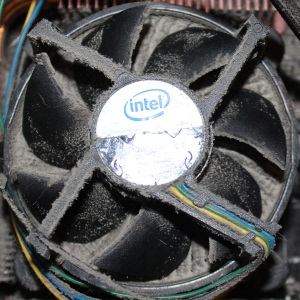
A quick investigation shows that the fan & heat sink for the CPU are covered in dust. The photo probably doesn’t do it justice but the heat sink is completely filled in with dust and the fan blades are coated as well.
I clean everything up with a small stiff bristle paint brush, which Claire graciously let me use and we’re back in business. Claire walks past the computer and on the way to the bedroom tells me that the computer is making a weird humming sound.
Further investigation shows that it isn’t anything usual except that the CPU fan can actually spin properly now as it isn’t being restricted by the dust between it and the heat sink and the additional weight of it caked on the underside of the fan blades.
Oops.