 Half way through last month, I upgraded the version of WordPress that powers this site. During the upgrade process, I neglected to update the
 .htaccess file with additional configuration options. For those unaware, the .htaccess file is a plain text file used in the Apache web server to allow per site, per directory configuration of the web server.
As most are aware, hosting a web site generally costs money. Like most things which cost money, the people paying the bills generally like to get as much bang for their buck as possible. Unfortunately, there are people which take it upon themselves to reduce the bang, to a point where it will end up costing the site owner more money to host thier site.
 The scenario I speak of very nearly happened to this site over the last fortnight. The additional configuration options which I neglected to add back into the
 .htaccess file were used to stop people linking directly to my images from another website; its generally referred to as hot linking.
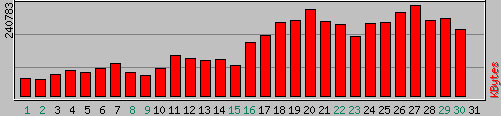
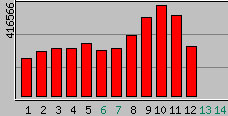
Once I had realised that I hadn’t updated the information, I immediately checked my traffic logs to see if it had done any damage yet. At that point, somewhere around the 12th April there was no noticeable impact so as a test I thought I would allow Google access to the images via http://images.google.com.au. A few days later and the impact was clear; daily data consumption had increased from approximately 60Mb to 200Mb.
For the first week of May, the daily consumption has carried on from April. From the 8th May onwards, something changed dramatically as the site started to push out a literally double my previous daily peak! If the traffic trend from April continued for an entire month (~200Mb/day), I would exceed my monthly hosting plan and be billed an additional AU$600! When I checked how much traffic my site has been moving in the last couple of days, I was shocked to find out that if that trend continued (> 400Mb/day) that I’d be billed in excess of AU$1800 for a month of hosting!
To make sure this doesn’t happen again, I have re-enabled the hot linking protection through the .htaccess file. If you’re having a similar problem, you could achieve a similar outcome as follows:
<IfModule mod_rewrite.c>RewriteEngine OnRewriteBase /RewriteCond %{HTTP_REFERER} !^$RewriteCond %{HTTP_REFERER} !^http://(www\.)?lattimore\.id\.au [NC]RewriteRule \.(gif|jpe?g)$ - [NC,F]</IfModule>
Each line of the previous block is explained as follows:
- Check if the
mod_rewrite module is available in Apache
- Enable the rewrite engine
- Set the base to the root of the domain
- Check that the referring information in your browser is not blank
- Check that the referring information in your browser is not www.lattimore.id.au
- Do a case insensitive check if the request has a
.gif, .jpg or .jpeg in it and return a HTTP Forbidden to deny access
In a language that makes sense, it says that if you’re trying to access images on my site and you aren’t viewing the images from my site or entering the URL directly into your browser; you will be denied access to the image. So, if you were to directly link to one of my images from another website, your referring information won’t be blank and it won’t be this site – therefore you won’t be given access to the image.
If you did want to provide Google Images access to your files, you could insert the below two lines after line 5 above:
RewriteCond %{HTTP_REFERER} !google\. [NC]RewriteCond %{HTTP_REFERER} !search\?q=cache [NC]
Traffic to your website is generally “a good thing”™. However, if you’re the one paying the bills – you’ll be well served to keep an eye on your website hosting statistics to make sure you aren’t going to get a nasty surprise.

 As she was growing up, she was the most beautifully natured dog. About the only problem we ever had with her in that regard was that, at times, she could be a little snappy around little kids. She would never really bite, however if they were patting her too hard or doing something to annoy her – she’d give a little snap in their direction and it soon brought the kids back inline. One of my clearest memories of Gizmo happened regularly in the evening when George (read: Dad) would return home from work. As soon as Dad made any noise as he was pulling into the driveway, Gizmo would bolt flat out from one end of the house to the other. She would arrive at her destination with gusto and excitement, tail wagging furiously just begging to get a pat! Unfortunately, as she was growing up her excitement often got the better of her bladder and she would piddle near the door!