Category Archives: Search

Removing Indexed Content From Google The Easy Way

Google are constantly improving their services and during April they updated their Google Webmasters Tools; this release relates to removing content that has already been indexed by Google.

Google have supported removing content from their service for a long time, however the process was often slow to take. With the recent addition of the URL removal into Google Webmasters Tools, its now possible to process the removal of a page quite quickly.

As with everything associated to Google Webmaster Tools, the web site to act on first needs to be verified. Once verified, there is now a URL Removals link under the Diagnostics tab. The removal service supports removing URL’s in the following ways:

  • individual web pages, images or other files
  • a complete directory
  • a complete web site
  • cached copies of a web site

To remove an individual web page, image or file – the URL must:

  • return a standard HTTP 404 (missing) or 410 (gone) response code
  • be blocked by the robots.txt file
  • be blocked by a robots tag

Removing a directory has less options available, it must be blocked using the robots.txt file. Submitting http://mydomain.com/folder/ would remove all objects which reside under that folder including all web pages, images, documents and files.

To remove an entire domain from the Google index, you need to block it using a robots.txt file and submit the expedited removal request. Google have once more reinforced the point that this option should not be used to remove the wrong ‘version’ of your site from the index, such as a www versus non-www version. To handle this, nominate the preferred domain within the Google Webmaster Tools and optionally redirect the wrong version to the correct version using a standard HTTP 301 redirect.

Cached copies of web pages can be removed by setting the <meta> robots attribute with a noindex on the given page(s) and submitting the removal request. By using this mechanism, Google will never re-include that URL so long as the robots noindex <meta> data is present. By removing the robots noindex <meta> data, you are instructing Google to re-include that URL, so long as it isn’t being block by alternate means such as a robots.txt file. If the intention is to simply refresh a given set of web pages, you can also change the content on those pages and submit the URL removal request. Google will fetch a fresh copy of the URLs, compare them against their cached copies and if they are different immediately removed the cached copy.

After submitting requests, it’s possible to view the status of the request. They will list as pending until they have been processed, denied if the page does not meet the removal criteria and once processed they will be moved into the ‘Removed Content’ tab. Of course, you can re-include a removed page at any time as well. It should be noted that if you remove a page and don’t manually re-include the web page(s) after exclusion, the removed page(s) will remain excluded for approximately 6 months – after which they will be automatically re-included.

Being able to remove content from the Google index so quickly is going to come in handy when certain types of content are indexed by accident and need to be removed with priority.
Google Search Revolutionised Through Vertical Integration

Google have announced a revolutionary change to their famed search engine and its called universal search. The millions of people that use Google Search every day of the week would have probably considered it fairly ‘universal’ before, however that hasn’t got a drop on what they’re releasing to the market now!

Google universal search is going to allow you to search, as you did before with the familiar single search box; however many additional sources will be used to formulate the search results. As most people are aware, Google houses many different indexes of information:

  • web sites
  • news
  • books
  • local
  • images

which have been available to internet users through different search locations such as http://www.google.com or http://news.google.com. While separating out various types of search information into different web sites might have made sense from a development and technical level initially, Google were not leveraging their various indexes to their potential. Even with the initial release of the universal search service, I’m sure there will be significant improvements to come in the near future.

The key to the Google universal search is that their disparate search indexes have been vertically integrated. For those that aren’t aware, vertical integration typically refers to taking totally separate sets, be it a business, process or data and combining them into a single unified service. By removing the barriers between their various search indexes, Google have knocked down the information silos they helped build during development.

To the average user, this will mean they are more likely to find the information they are looking for on the Google home page. When a user searches, results will be returned from various sources and combined based on relevance. It will now be common place to see:

  • web sites
  • news
  • books
  • local
  • images
  • video

all within a single search results page. Of course, it is unlikely that a search would return results from all indexes at the same time. After all, the algorithms are looking to return the most relevant content to the user – not the most sources. As such, if the algorithms deem it appropriate then you may only see web and image results with no video or book content.

This is an exciting space and it is going to be interesting watching how the search engine optimisation landscape changes now that Google universal search has been released into the wild!

Microsoft Live Search Tactics To Claw Back Market Share

I keep getting the annoying nag message from Microsoft MSN Messenger to upgrade and I’ve been ignoring it for months. I’ve currently got the clearly outdated version 7.5 installed, which is no where near bleeding edge enough – so apparently I need to upgrade post haste.

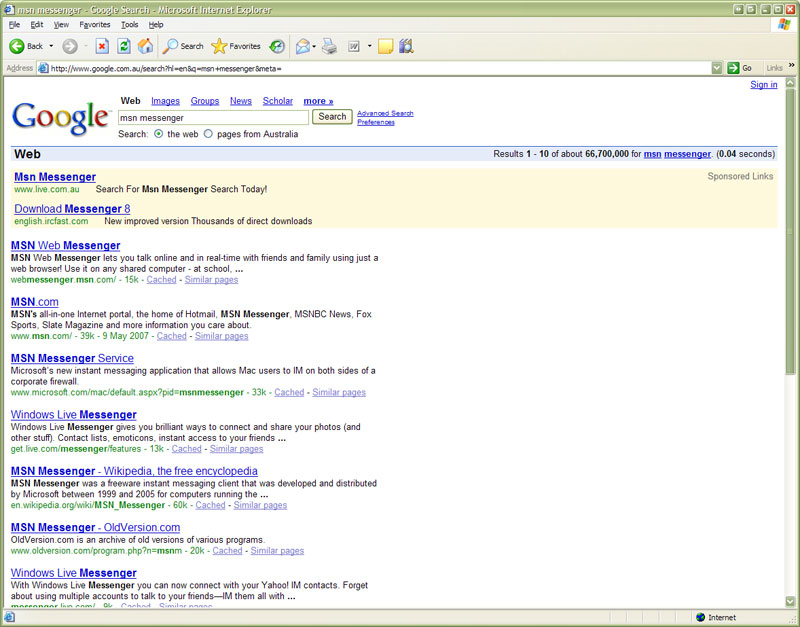
Microsoft 'MSN Messenger' search result pointing to Microsoft Live Search within Google pay per click marketingBeing the diligent computer user, I uninstalled MSN Messenger 7.5 and the original Windows Messenger that comes with Windows XP Professional. Not knowing the web address for MSN Messenger, I googled msn messenger to be presented with the search result to the left.

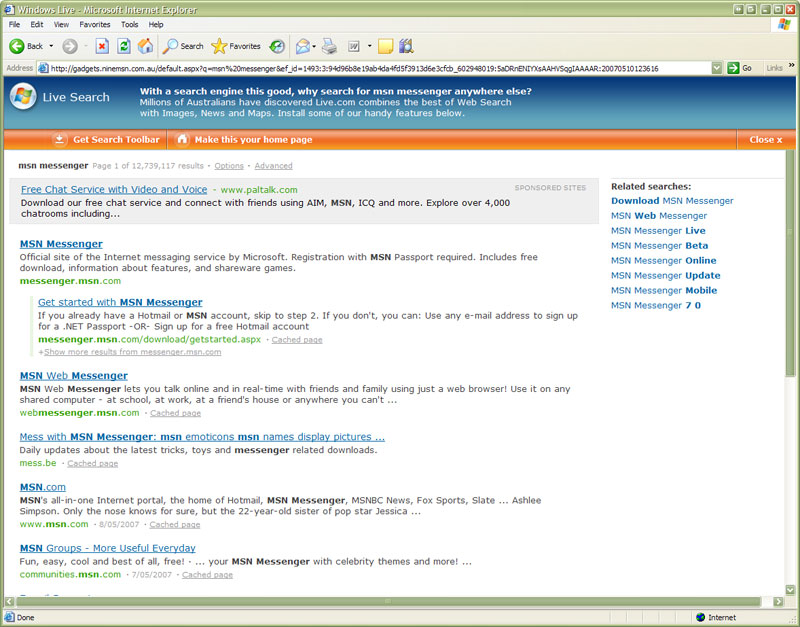
After glancing at the advertisement and seeing “Msn Messenger” as the advertising text, I clicked the link expecting to be taken to the Messenger home page on the Microsoft web site. No, that isn’t what I got at all – instead it redirected me to the new Microsoft Live Search web site, with my “MSN Messenger” search already performed. Not only that, they had a nifty JavaScript sliding panel with some useful advertising promoting Microsoft Live Search and telling me that it is “the ducks nuts”. After a few seconds, the useful advertising panel automatically slided away to leave the standard Microsoft Live Search page.

Microsoft Live Search presenting 'useful advertising' telling you why their service is so fantastic after getting to their search engine via a Google search!When the biggest software company in the world is required to participate in pay per click advertising on a competitors network to drive traffic to their own search engine, I think it is a pretty sure sign that their competitor is doing something right. I can understand that someone like Google and Yahoo! might advertise on their competitions web sites for pay per click marketing services but I’m yet to see an advertisement on Google or Yahoo! telling me that I should be using their competitors search engines.

Search Engine XML Sitemap Improvements

In December 2006, Google, Yahoo! & Microsoft collaborated and all agreed to support the new XML sitemap protocol that Google released as a beta in 2005.

Implementing an XML sitemap for a web site is a simple way for a webmaster to inform the search engines what content exists on their site that they absolutely want indexed. The XML sitemap does not necessarily need to include all content on a site you want indexed, however the content that exists within the XML sitemap is looked upon as a priority for indexing.

When the XML sitemap protocol was initially released by Google as a beta, webmasters needed to inform Google of its existence through the Google Webmasters Tools utility. When Yahoo! and Microsoft joined the party, all vendors accepted a standard HTTP request to a given URL as notification of the XML sitemaps location. These methods have worked fine, however required a little bit of extra work for each search engine. It was recently announced that you can now specify the location of the XML sitemap within a standard robots.txt file.

It’s a small change to the robots.txt file, however it’s an improvement that makes so much sense since the robots.txt file is specifically for the search engine crawlers. If you want to use this new notification method, simply add the following information into your existing robots.txt file:

  • Sitemap: <sitemap_location>

It is possible to list more than one sitemap using this mechanism, however if you’re already providing a sitemap index file – a single reference to the index file is all that is required. The sitemap_location should be the fully qualified location of the sitemap, such as http://www.mydomain.com/sitemap.xml.

Search Engine Image Traffic Recovering

In January 2006, I posted about Chuck Norris and the amazing “Chuck Norris Facts” that were blazing around the internet in emails. A short period of time after that post was indexed, it started showing up within the search engine result pages for most things revolving around Chuck Norris and his amazing facts.

Traffic to your web site is generally a good thing, no matter how it gets to your site. Unfortunately, the cost of being prominently placed within the search engine results had a downside and my site exceeded its monthly bandwidth allocation. I contacted my web host and they graciously re-enabled my account for the rest of the month.

The table below shows the monthly image search referrals. As you can see, the search engine image referrals double between December 2005 and the following month. The referrals continued to increase steadily, until half way through April it started to jump again and by May it was completely out of control, saturating my monthly bandwidth allocation. In case you’re wondering what or who was the culprit, it was a whole swag of particularly lazy MySpace folk.

Jan Feb Mar Apr May Jun Jul Aug Sep Oct Nov Dec
2005 1 258 199 76 72 507 988 1823
2006 4409 4447 5392 23733 53573 43600 22374 19730 27561 13362 57 40
2007 55 38 56 2141*
* Incomplete months worth of data

To make sure the bandwidth theft didn’t happen again, I took some pretty drastic measures by blocking all search engines from indexing my /images/ folder using the robots.txt file and implemented hot link protection via the .htaccess file. By half way through October 2006, the change had fully kicked in, dropping my monthly image search referrals from over 50000 to under 100 per month.

Since the mania surrounding Chuck Norris faqs has subsided, I decided that it was time to remove the heavy handed restriction placed over my /images/ folder. I’m currently allowing everyone to index everything once more and am even participating in the Google Image search beta, which can be enabled through the Google Webmasters Console.

The restrictions were removed at the end of March 2007 and half way through April, the search referrals are already on the increase again. Once this month is finished, I would expect to have approximately 4400 search referrals, which is back inline with where the site was in February/March 2006.

Onward and upward I say.