All posts by Alistair Lattimore

About Alistair Lattimore

My name is Alistair Lattimore, I'm in my very early 30's and live on the sunny Gold Coast in Australia. I married my high school sweet heart & we've been together for longer than I can remember. Claire and I started our family in September 2008 when Hugo was born and added a gorgeous little girl named Evie in May 2010. You can find me online in the typical hangouts, Google+, Twitter & facebook. .

Oracle COALESCE Function

Oracle implements many convenient functions to handle NULL values in the database, one of which is the COALESCE function. The Oracle COALESCE function accepts a varying length list of arguments and returns the first non-NULL value in the list. If all arguments in the list evaluate to a NULL value, then the COALESCE function will return a NULL value.

The standard format for the COALESCE function is:

  1. COALESCE(arg1, arg2, ..., argN)

There are many practical uses for the Oracle COALESCE function, two common actions include:

  1. Passing in a list of common items, which may or may not have data in them in a hope you’ll get back something which you can use.
  2. Generating a default value for a field which contains NULL values.

As a simple, yet practical example of how to use the COALESCE function; following demonstrates how to substitute in a default value in a SELECT statement when there are NULL values present:

  1. SELECT COALESCE(ADDRESS2, 'EMPTY') FROM ADDRESSES

Since there is always more than one way to achieve the same outcome, the following two statements will return the same results as the previous example:

  1. SELECT DECODE(ADDRESS2, NULL, 'EMPTY', ADDRESS2) FROM ADDRESSES
  2. SELECT CASE WHEN ADDRESS2 IS NULL THEN 'EMPTY' ELSE ADDRESS2 END FROM ADDRESSES

The next time you’re dealing with NULL values and you’d prefer a nicer looking result; consider giving the COALESCE function a try.

The Cost Of Popularity

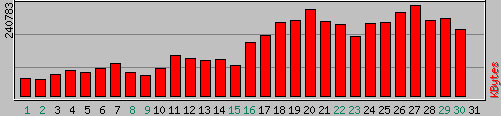
Bandwidth usage during April 2006 for https://www.lattimore.id.auHalf way through last month, I upgraded the version of WordPress that powers this site. During the upgrade process, I neglected to update the .htaccess file with additional configuration options. For those unaware, the .htaccess file is a plain text file used in the Apache web server to allow per site, per directory configuration of the web server.

As most are aware, hosting a web site generally costs money. Like most things which cost money, the people paying the bills generally like to get as much bang for their buck as possible. Unfortunately, there are people which take it upon themselves to reduce the bang, to a point where it will end up costing the site owner more money to host thier site.
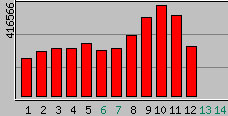
Bandwidth usage during May 2006 for https://www.lattimore.id.auThe scenario I speak of very nearly happened to this site over the last fortnight. The additional configuration options which I neglected to add back into the .htaccess file were used to stop people linking directly to my images from another website; its generally referred to as hot linking.

Once I had realised that I hadn’t updated the information, I immediately checked my traffic logs to see if it had done any damage yet. At that point, somewhere around the 12th April there was no noticeable impact so as a test I thought I would allow Google access to the images via http://images.google.com.au. A few days later and the impact was clear; daily data consumption had increased from approximately 60Mb to 200Mb.

For the first week of May, the daily consumption has carried on from April. From the 8th May onwards, something changed dramatically as the site started to push out a literally double my previous daily peak! If the traffic trend from April continued for an entire month (~200Mb/day), I would exceed my monthly hosting plan and be billed an additional AU$600! When I checked how much traffic my site has been moving in the last couple of days, I was shocked to find out that if that trend continued (> 400Mb/day) that I’d be billed in excess of AU$1800 for a month of hosting!

To make sure this doesn’t happen again, I have re-enabled the hot linking protection through the .htaccess file. If you’re having a similar problem, you could achieve a similar outcome as follows:

  1. <IfModule mod_rewrite.c>
  2. RewriteEngine On
  3. RewriteBase /
  4. RewriteCond %{HTTP_REFERER} !^$
  5. RewriteCond %{HTTP_REFERER} !^http://(www\.)?lattimore\.id\.au [NC]
  6. RewriteRule \.(gif|jpe?g)$ - [NC,F]
  7. </IfModule>

Each line of the previous block is explained as follows:

  1. Check if the mod_rewrite module is available in Apache
  2. Enable the rewrite engine
  3. Set the base to the root of the domain
  4. Check that the referring information in your browser is not blank
  5. Check that the referring information in your browser is not www.lattimore.id.au
  6. Do a case insensitive check if the request has a .gif, .jpg or .jpeg in it and return a HTTP Forbidden to deny access

In a language that makes sense, it says that if you’re trying to access images on my site and you aren’t viewing the images from my site or entering the URL directly into your browser; you will be denied access to the image. So, if you were to directly link to one of my images from another website, your referring information won’t be blank and it won’t be this site – therefore you won’t be given access to the image.

If you did want to provide Google Images access to your files, you could insert the below two lines after line 5 above:

  1. RewriteCond %{HTTP_REFERER} !google\. [NC]
  2. RewriteCond %{HTTP_REFERER} !search\?q=cache [NC]

Traffic to your website is generally “a good thing”™. However, if you’re the one paying the bills – you’ll be well served to keep an eye on your website hosting statistics to make sure you aren’t going to get a nasty surprise.

ASP.net 2.0: CSS Control Adapter Toolkit

Anyone that has worked with ASP.net that cares about web standards has no doubt lamented the HTML output of most web controls at some point. Thankfully with ASP.net 2.0, times are changing for the better. Scott Guthrie recently introduced the CSS Control Adapter Toolkit which provides a seamless way to improve the HTML output of your controls without effecting how they are used.

Being able to change the HTML output of a server control isn’t a new idea, you’ve been able to do it since day dot. Unfortunately, each method which allows you to override the HTML output has its own problems. In the case of a custom control, they are a lot of work to develop from the ground up and if you simply inherit a web control you then lose the ability to just ‘drag and drop’ and have it just work. Using CSS Control Adapters would allow you to change the HTML output of a web control, without creating a custom control or changing how you use the standard web controls.

To provide a simple example, consider a treeview style menu control. For the sake of an example, lets assume that the HTML output of that control by default is a convoluted nested mess of <table> tags. Since you’re a standards advocate and you care about the health of your clients browser, you’d really like to clean that up. You could implement a CSS Control Adapter to render you’re favourite treeview menu control using an elegant unordered list (<ul>). Better yet, maybe you don’t get consistent rendering of your fangdangle control on a particular platform/browser (a handheld device might be an excellent example). You could implement a handful of CSS Control Adapters for your web control and then customise which one is used through the use of a .browser file. The .browser files are used to register your adapters and also provides a simple way to define that adapter A is used in browsers H and I while adapter B is used in browsers E, F and G.

The significance of the CSS Control Adapter is that you can change the HTML output of a server control, without changing how the standard object is used. This means you could start implementing adapters for your existing code base, enable them and you haven’t had to change any of your existing code or how you were using the web controls! Pretty neat stuff I think and definitely a positive step in the right direction for ASP.net 2.0!

A Change Is As Good As A Holiday

For a while now I’ve felt like learning a new programming language, something different which doesn’t have the very familiar C-style syntax.

In the last year or so, there has been a lot of press around the ‘new’ programming language Python. Python is an interpreted dynamic object oriented language, in fact the language itself is implemented using objects such that a primitive like an integer is in fact an object. Python provides the ability to write command line, network aware, GUI and web based applications.

I’ve decided to give Python a serious look and over the coming weeks and months, I’ll be posting various code snippets and thoughts about it here for you to read and evaluate for yourself. Hopefully we’ll all learn something useful from it, happy hacking.

Farewell Gizmo

Gizmo, the Lattimore family pet.One day about in about 1990, my cousin Rachel turned up at my place with a tiny golden Pomeranian cross Corgi puppy. From memory, mum & dad were not that pleased about the situation since they had no notice what so ever! None the less, the cute fluffy puppy soon became part of the family.

I don’t recall who named her, however she got her name “Gizmo” from the 1984 movie Gremlins. When Gizmo was still very tiny, she hadn’t grown quite into her ears yet. As such, when she was on her back – her ears deflopped and sat up nicely, she looked very cute.

Gizmo, one of the lead characters out of the 1984 Gremlins movie.As she was growing up, she was the most beautifully natured dog. About the only problem we ever had with her in that regard was that, at times, she could be a little snappy around little kids. She would never really bite, however if they were patting her too hard or doing something to annoy her – she’d give a little snap in their direction and it soon brought the kids back inline. One of my clearest memories of Gizmo happened regularly in the evening when George (read: Dad) would return home from work. As soon as Dad made any noise as he was pulling into the driveway, Gizmo would bolt flat out from one end of the house to the other. She would arrive at her destination with gusto and excitement, tail wagging furiously just begging to get a pat! Unfortunately, as she was growing up her excitement often got the better of her bladder and she would piddle near the door!

Gizmo also loved riding in cars. Our family owns an old Ford Falcon ute which we restored many moons ago. It doesn’t get used for a lot of stuff these days, mostly heading out to the dump and for convenience. Since it was an old ute, it had a very distinctive sound to the engine and exhaust; Gizmo knew it well. As soon as we’d turn it over, she’d be normally be there in a snap hoping she could come for a drive. She’d sit on the parcel shelf, and stick her head out the window in the wind, she loved it. For those uninitiated, the parcel shelf is the small shelf that is at about shoulder height when sitting in a ute and is immediately behind the seats.

In the last few years, Gizmo’s health has been quietly deteriorating. She has been nearly totally deaf for the last two years and as old age set in, her general mobility has decreased too. In the last year, that has since become more of an issue as her arthritis started to really hinder her movement. Getting up and down steps had become difficult and you could see her back hips and legs had become a little weak. Its really sad to see your family pet get old and its a shame that we outlast them I think, but it is just part of the life cycle.

I’d prefer to remember all of the great times she has brought our family and friends over the years. You’ll be missed Gizzy.